Thursday, 14 February 2013

Thursday, 3 January 2013
What will be the output of the following program in c++?
What will be the output of the following program in c++?
when value of a is input as (i)6 , (ii)0:
int a, b=3 ;
cin >> a ;
if (a)
b=a++ -1;
cout<<"a="<<a<<endl ;
cout<<"b="<<b<<endl ;
--------------------------------------…
I want to know to know how the result came?
so please explain me.
int a, b=3 ;
cin >> a ;
if (a)
b=a++ -1;
cout<<"a="<<a<<endl ;
cout<<"b="<<b<<endl ;
--------------------------------------…
I want to know to know how the result came?
so please explain me.
Answer:
if (a), when a is either positive or negative as int x = -1;
if (x)
cout << "R";// This will be printed => Condition is true.
When anything within brackets is +ve or negative in if's brackets condition is considered as true.
Similarly if within the bracket of if 0 comes, the condition is False i.e.
if (0)
cout << "R"; // R will not be printed.
In your program, when user enters 6, a number other than ZERO, condition becomes true and the thing with in the body of if is executed => b's value will be replaced by (6-1) = 5. (if user enters 6 as 'a')
When user enters 0, the statement within the if body will not be executed, and value stored in b will remain unchanged (i.e. b = 3).
(i) a = 6 + 1 = 7 // 6 + 1 because it was incremented.
b = 6 - 1 = 5
(ii) a = 0
b = 3.
Question:
1. Which of the following is true?
A. 1
B. 66
C. .1
D. -1
E. All of the above
if (x)
cout << "R";// This will be printed => Condition is true.
When anything within brackets is +ve or negative in if's brackets condition is considered as true.
Similarly if within the bracket of if 0 comes, the condition is False i.e.
if (0)
cout << "R"; // R will not be printed.
In your program, when user enters 6, a number other than ZERO, condition becomes true and the thing with in the body of if is executed => b's value will be replaced by (6-1) = 5. (if user enters 6 as 'a')
When user enters 0, the statement within the if body will not be executed, and value stored in b will remain unchanged (i.e. b = 3).
(i) a = 6 + 1 = 7 // 6 + 1 because it was incremented.
b = 6 - 1 = 5
(ii) a = 0
b = 3.
Question:
1. Which of the following is true?
A. 1
B. 66
C. .1
D. -1
E. All of the above
Wednesday, 2 January 2013
What is the difference between a pointer and an array?
What is the difference between a pointer and an array?
Pointers are variable. You point to one variable, and after sometime you start pointing to another variable with the same pointer.
Example:
int x = 1;
int *p = &x;
//in the next line you can say
*p = &b; // if b has been initialized.
Array name is the address to the first index of array. Array name is a CONSTANT Pointer => You cannot do a = a + 1; if a is an array. It will generate an error since it always point to same location.
When we do for example cout << *(a+1); (a is arraY) We give an offset and elements at 2nd index is printed. a still points to the first location.
Pointers are variable. You point to one variable, and after sometime you start pointing to another variable with the same pointer.
Example:
int x = 1;
int *p = &x;
//in the next line you can say
*p = &b; // if b has been initialized.
Array name is the address to the first index of array. Array name is a CONSTANT Pointer => You cannot do a = a + 1; if a is an array. It will generate an error since it always point to same location.
When we do for example cout << *(a+1); (a is arraY) We give an offset and elements at 2nd index is printed. a still points to the first location.
Thursday, 27 December 2012
Difference between cin.getline and cin in C++
You should know the difference between
In cin>>string, user keeps on entering characters unless either Enter key or Spacebar is pressed or 10 characters are entered and stored. Where as in Case of cin.getline User may press Enter key, Spacebar or whatever except the Delimeter character (in this case '\n' which is Enter Key). Size of array should also be kept in mind that compiler won't allow you to store more than size of array (10 characters in this case).
char string[ 10
];
cin >>
string;
And
cin.getline(string,10,'\n');
Static in C++
What is Static in C++?
Ans: I believe that Examples are the best way to make someone understand so:
#include <iostream>
using namespace std;
f1();
void main()
{
f1();
f1();
}
f1()
{
static int s = 0;
cout << s++ << endl;
}

The value of 's' does not start from 0 when the function is called second time, rather it starts from last value of of s when function was called last time (i.e. 1 in this case when Function is called second Time).
Tuesday, 11 December 2012
Precedence of operators in C++
Order of execution within a statement is called Precedence.
For Example: 2+2 % 2 gives 2 NOT 0. How did I come to know?
What will happen first is predefined according to the picture below:
 Link to view this image: http://i.imgur.com/lffHR.jpg
OR goto http://en.cppreference.com/w/cpp/language/operator_precedence
For Example: 2+2 % 2 gives 2 NOT 0. How did I come to know?
What will happen first is predefined according to the picture below:
OR goto http://en.cppreference.com/w/cpp/language/operator_precedence
Sunday, 9 December 2012
Program to Copy one String in another String in C++
#include <iostream>
using namespace std;
void copy1( char *, const char * );
int main()
{
char String1[10];
char String2[] = "Hello";
copy1(String1 , String2);
cout << String1 << endl;
return 0;
}
void copy1(char *String1, const char *String2)
{
for (int i = -1; i<10; String1[i] = String2[i])
i++;
}
//============================================================================
You can also use following copy function.
void copy1(char *String1, const char *String2)
{
for (int i = 0; (String1[i] = String2[i]) != '\0'; i++);
}
//============================================================================
Another way: or you can use following copy function.
void copy1(char *String1, const char *String2)
{
for ( ; (*String1 = * String2) != '\0' ; String1++, String2++);
}
Wednesday, 5 December 2012
Convert lowercase letters to uppercase letters
Header file: cctype
// Converting lowercase letters to uppercase letters
#include <iostream>
#include <cctype> // For the use of toupper Function.
using namespace std;
int main()
{
char a = 'a';
char b = toupper(a);
cout << b << endl;
return 0;
}
//====================================
Better way:
#include <iostream>
#include <cctype>
using namespace std;
int main()
{
char a = 'a';
cout << static_cast<char>( toupper(a) ) << endl;
return 0;
}
//---------------------------------------------------
//You will be thinking now, why we used static_cast<char> ?
//If we would have done as follows, what was wrong?
#include <iostream>
#include <cctype>
using namespace std;
int main()
{
char a = 'a';
cout << toupper(a) << endl;
return 0;
}
// Converting lowercase letters to uppercase letters
#include <iostream>
#include <cctype> // For the use of toupper Function.
using namespace std;
int main()
{
char a = 'a';
char b = toupper(a);
cout << b << endl;
return 0;
}
//====================================
Better way:
#include <iostream>
#include <cctype>
using namespace std;
int main()
{
char a = 'a';
cout << static_cast<char>( toupper(a) ) << endl;
return 0;
}
//---------------------------------------------------
//You will be thinking now, why we used static_cast<char> ?
//If we would have done as follows, what was wrong?
#include <iostream>
#include <cctype>
using namespace std;
int main()
{
char a = 'a';
cout << toupper(a) << endl;
return 0;
}
Tuesday, 4 December 2012


Sunday, 2 December 2012
What is Switch in C++?
#include<iostream>
using namespace std;
int main()
{
cout<< "Enter 1 or 2 -------> ";
int a; cin>>a;
switch (a)
{
case 1:
cout<<"1 pressed"<<endl;
break;
case 2:
cout<<"2 pressed"<<endl;
break;
}
return 0;
}
//===============================================================================
You may want to see: Calculator using switch statement. Takes Expression as we write on our copy.
using namespace std;
int main()
{
cout<< "Enter 1 or 2 -------> ";
int a; cin>>a;
switch (a)
{
case 1:
cout<<"1 pressed"<<endl;
break;
case 2:
cout<<"2 pressed"<<endl;
break;
}
return 0;
}
//===============================================================================
You may want to see: Calculator using switch statement. Takes Expression as we write on our copy.
Saturday, 1 December 2012
What are Pointers in C++? Don't get affraid of Pointers, these are easy!
Points to Remember:
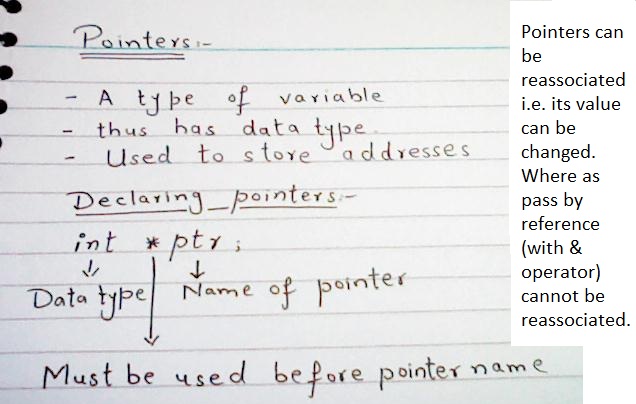
- * is used to acces value of a pointer. It's called indirection or dereferencing operator.
- & is used to get the address of a variable or a pointer. It's called address operator.
- While declaring a pointer * indicates that the variable being declared is a pointer.
How we use Pointers?
Ans:
#include<iostream>
using namespace std;
int main()
{
int *Ptr; //Declaring a pointer named Ptr, you can change the name.
int a = 7;
Ptr = &a; //Pointers store addresses. Address of 'a' variable will be stored in the pointer.
cout<< *Ptr<<endl; //* means the value of Ptr where it's pointing
return 0;
}
//===============================================================================
//array_name gives the address of first location (index number 0) of array in hexadecimal system.
#include<iostream>
using namespace std;
int main()
int z[] = { 1, 2, 3, 4, 5 };
cout<<z;
return 0;
}
//===============================================================================

Both will have same output

But if we'll do something as below, then it's stupidity, because array_name gives the address of first location (index number 0) of array in hexadecimal system.

#include<iostream>
using namespace std;
int main()
int z[] = { 1, 2, 3, 4, 5 };
cout<<*z;
return 0;
}
//===============================================================================
#include<iostream>
using namespace std;
int main()
int z[] = { 1, 2, 3, 4, 5 };
cout<< *(z+4) << endl;// 5 is printed.
cout<< *z + 3 << endl;// = value of z at first location (1) + 3 => 4
return 0;
}
//===============================================================================
#include<iostream>
using namespace std;
int main()
int *Ptr;
int z[] = { 1, 2, 3, 4, 5 };
Ptr = z; // or You can write Ptr = &z[0];
cout<< Ptr[3]<<endl;
}
//===============================================================================
#include<iostream>
using namespace std;
int main()
int *Ptr;
int z[] = { 1, 2, 3, 4, 5 };
Ptr = z; // or You can wrtie Ptr = &z[0];
Ptr++; // Now pointer starts pointing to the next integer stored in array i.e. 2
cout<< *Ptr <<endl;
}
//===============================================================================
•Subtracting pointers
–Returns number of elements between two addresses

This means that p1_array is 3 ahead of p_array.
Lets move towards Void Pointers
We can't dereference a void pointer:
Example:

What if we want to dereference a void pointer???
We will have to change our style for this.
#include <iostream>using namespace std;
int main()
{
int x = 5;
void *Voidptr; //declaring a void pointer, which will point to a variable of type void.
Voidptr = &x; //initializing void pointer with the address of x variable of int type.
//If we want to access x, then what will we do? Will we do cout << *Voidptr; "NO"
//We cannot dereference a void pointer because it's pointing to a variable of type void.
//So, we cannot do cout << *Voidptr;
//Therefore we'll introduce another pointer (say ptr1) of type int which will point to x variable indirectly.
int *ptr1 = static_cast<int*>(Voidptr); /*changing the type of pointer from void to int for one step and storing it permanently.*/
cout<<*ptr1;
return 0;
}
Feel free to ask if there is any problem?
We will have to change our style for this.
int main()
{
int x = 5;
void *Voidptr; //declaring a void pointer, which will point to a variable of type void.
Voidptr = &x; //initializing void pointer with the address of x variable of int type.
//We cannot dereference a void pointer because it's pointing to a variable of type void.
//So, we cannot do cout << *Voidptr;
//Therefore we'll introduce another pointer (say ptr1) of type int which will point to x variable indirectly.
cout<<*ptr1;
}
Feel free to ask if there is any problem?
Friday, 30 November 2012
How to make the numbers fall in console?
#include<iostream>
#include<windows.h>
using namespace std;
//Function to move the cursor.
void gotoxy(int x, int y)
{
HANDLE console_handle;
COORD cursor_coord;
cursor_coord.X=x;
cursor_coord.Y=y;
console_handle=GetStdHandle(STD_OUTPUT_HANDLE);
SetConsoleCursorPosition(console_handle,cursor_coord);
}
int main()
{
for (int row = 0; row<25; row++)
{
gotoxy(25,row);
cout<<"5";
Sleep(200);
gotoxy(25,row);
cout<<" ";
}
}
//=========================================================================
Now, it's easy if you want to change your column. Just add a simple condition.
I recommend, before you goto the following program, try to think, what the condition can be?
//Program to drop a number in different column.
#include<iostream>
#include<windows.h>
using namespace std;
//Function to move the cursor.
void gotoxy(int x, int y)
{
HANDLE console_handle;
COORD cursor_coord;
cursor_coord.X=x;
cursor_coord.Y=y;
console_handle=GetStdHandle(STD_OUTPUT_HANDLE);
SetConsoleCursorPosition(console_handle,cursor_coord);
}
int main()
{
int column = rand() % 80; //80 because Total columns are 0-79. i.e. less than 80.
for (int row = 0; row<25; row++)
{
gotoxy(column,row);
cout<<"5";
Sleep(200);
gotoxy(column,row);
cout<<" ";
//Now we add another condition so that our number again comes at first row and a different
if (row == 24) // last line of console screen.
{
row = 0;
column = rand() % 80;
}
}
}
//========================================================================
Similarly you can increase the number of Numbers falling downward.
//Program for falling two numbers in changing columns.
#include<iostream>
#include<windows.h>
using namespace std;
//Function to move the cursor.
void gotoxy(int x, int y)
{
HANDLE console_handle;
COORD cursor_coord;
cursor_coord.X=x;
cursor_coord.Y=y;
console_handle=GetStdHandle(STD_OUTPUT_HANDLE);
SetConsoleCursorPosition(console_handle,cursor_coord);
}
int main()
{
int column = rand() % 80; //80 because Total columns are 0-79. i.e. less than 80.
int column1 = rand() % 80;
for (int row = 0; row<25; row++)
{
gotoxy(column,row);
cout<<"2";//first number.
gotoxy(column1,row);
cout<<"9";
Sleep(200);
gotoxy(column,row);
cout<<" ";
gotoxy(column1,row);
cout<<" ";
//Now we add another condition so that our number again comes at first row and a different
if (row == 24)
{
row = 0;
column = rand() % 80;
column1 = rand() % 80;
}
}
}
#include<windows.h>
using namespace std;
//Function to move the cursor.
void gotoxy(int x, int y)
{
HANDLE console_handle;
COORD cursor_coord;
cursor_coord.X=x;
cursor_coord.Y=y;
console_handle=GetStdHandle(STD_OUTPUT_HANDLE);
SetConsoleCursorPosition(console_handle,cursor_coord);
}
int main()
{
for (int row = 0; row<25; row++)
{
gotoxy(25,row);
cout<<"5";
Sleep(200);
gotoxy(25,row);
cout<<" ";
}
}
//=========================================================================
Now, it's easy if you want to change your column. Just add a simple condition.
I recommend, before you goto the following program, try to think, what the condition can be?
//Program to drop a number in different column.
#include<iostream>
#include<windows.h>
using namespace std;
//Function to move the cursor.
void gotoxy(int x, int y)
{
HANDLE console_handle;
COORD cursor_coord;
cursor_coord.X=x;
cursor_coord.Y=y;
console_handle=GetStdHandle(STD_OUTPUT_HANDLE);
SetConsoleCursorPosition(console_handle,cursor_coord);
}
int main()
{
int column = rand() % 80; //80 because Total columns are 0-79. i.e. less than 80.
for (int row = 0; row<25; row++)
{
gotoxy(column,row);
cout<<"5";
Sleep(200);
gotoxy(column,row);
cout<<" ";
//Now we add another condition so that our number again comes at first row and a different
if (row == 24) // last line of console screen.
{
row = 0;
column = rand() % 80;
}
}
}
//========================================================================
Similarly you can increase the number of Numbers falling downward.
//Program for falling two numbers in changing columns.
#include<iostream>
#include<windows.h>
using namespace std;
//Function to move the cursor.
void gotoxy(int x, int y)
{
HANDLE console_handle;
COORD cursor_coord;
cursor_coord.X=x;
cursor_coord.Y=y;
console_handle=GetStdHandle(STD_OUTPUT_HANDLE);
SetConsoleCursorPosition(console_handle,cursor_coord);
}
int main()
{
int column = rand() % 80; //80 because Total columns are 0-79. i.e. less than 80.
int column1 = rand() % 80;
for (int row = 0; row<25; row++)
{
gotoxy(column,row);
cout<<"2";//first number.
gotoxy(column1,row);
cout<<"9";
Sleep(200);
gotoxy(column,row);
cout<<" ";
gotoxy(column1,row);
cout<<" ";
//Now we add another condition so that our number again comes at first row and a different
if (row == 24)
{
row = 0;
column = rand() % 80;
column1 = rand() % 80;
}
}
}
Thursday, 29 November 2012
Variable Data Type: Bool in C++
Bool is a variable data type which can store either 1 or 0.
#include<iostream>
using namespace std;
int main()
{
bool j,k,m;
bool i = j = k = m = 0;
cout<<j<<endl<<i<<endl<<k<<endl<<m<<endl;
return 0;
}
//===============================================================================
#include<iostream>
using namespace std;
int main()
{
bool j,k,m;
bool i = j = k = m = 1;
cout<<j<<endl<<i<<endl<<k<<endl<<m<<endl;
return 0;
}
//===============================================================================
#include<iostream>
using namespace std;
int main()
{
bool j,k,m;
bool i = j = k = m = 0;
cout<<j<<endl<<i<<endl<<k<<endl<<m<<endl;
return 0;
}
//===============================================================================
#include<iostream>
using namespace std;
int main()
{
bool j,k,m;
bool i = j = k = m = 1;
cout<<j<<endl<<i<<endl<<k<<endl<<m<<endl;
return 0;
}
//===============================================================================
Monday, 26 November 2012
Program to make a word appear for 1 second and then it disappears.
#include <iostream>
#include <windows.h>
using namespace std;
int main()
{
cout<<" a";
Sleep(1000);
cout<<"\b ";
cout<<endl;
return 0;
}
//You can extend this to get your required result.
2-D arrays
Program to assign a value (say 5) to 1st column of 4 by 3 array. 4 = rows & 3 = columns.
#include <iostream>
using namespace std;
int main()
{
int Rehan[4][3]; // This is the way to declare 2-d array named Rehan.
for (int i = 0; i <=3; i++) //This loop performs the following assigning of values.
Rehan[i][0] = 5;
//Rehan[0][0] = 5;
//Rehan[1][0] = 5;
//Rehan[2][0] = 5;
//Rehan[3][0] = 5;
for ( i = 0; i<=3; i++)
cout<<Rehan[i][0]<<endl;
//if we don't use loop then we had to do following.
//cout<<Rehan[0][0]<<endl;
//cout<<Rehan[1][0]<<endl;
//cout<<Rehan[2][0]<<endl;
//cout<<Rehan[3][0]<<endl;
return 0;
}
#include <iostream>
using namespace std;
int main()
{
int Rehan[4][3]; // This is the way to declare 2-d array named Rehan.
for (int i = 0; i <=3; i++) //This loop performs the following assigning of values.
Rehan[i][0] = 5;
//Rehan[0][0] = 5;
//Rehan[1][0] = 5;
//Rehan[2][0] = 5;
//Rehan[3][0] = 5;
for ( i = 0; i<=3; i++)
cout<<Rehan[i][0]<<endl;
//if we don't use loop then we had to do following.
//cout<<Rehan[0][0]<<endl;
//cout<<Rehan[1][0]<<endl;
//cout<<Rehan[2][0]<<endl;
//cout<<Rehan[3][0]<<endl;
return 0;
}
Now lets make a program for the same number of rows and columns. Storing 5 in the second column of array and then printing the whole array. Sounds Interesting, it's.
#include <iostream>
using namespace std;
int main()
{
int Rehan[4][3]={0};
for (int i = 0; i <=3; i++)
Rehan[i][1] = 5;
//What happens within the loop:
//Rehan[0][1] = 5;
//Rehan[1][1] = 5;
//Rehan[2][1] = 5;
//Rehan[3][1] = 5;
//Now we want to print whole of the array.
for (int rows = 0; rows<=3; rows++)
{
for (int columns = 0; columns <= 2; columns++)
cout<<Rehan[rows][columns]<<" ";
cout<<endl;
}
return 0;
}
Posted by Muhammad Rehan Qadri
Sunday, 25 November 2012
What is '&', lets clearify our concepts.


You can see a program at your right side.
It's simple.
Point to be noted: We say b = a;
When we increase b, the value of b will be increased but a will not change. Why? because b = a means that value of a will be stored in b. When we print 'a', the original value of a is printed.
In the second program, &b = a means that value of a is stored in b and "by changing b value of a will be changed".
In other words b and a correspond to same number (which is 1 initially).
Saturday, 24 November 2012
getch()
#include<iostream>
#include<conio.h>
using namespace std;
int main()
{
cout<<"Hi"<<endl;
getch(); //Screen is paused till the user presses a button.
cout<<"By"<<endl;
}
=========================================================================================
#include<iostream>
#include<conio.h>
using namespace std;
int main()
{
cout<<"Hi"<<endl;
int a = getch(); //Screen is paused till the user presses a button and that pressed button's ASCII will be stored in a.
cout<<a;
}
Did you see how useful is it?
Once you have stored the ASCII value, you can compare it. Let me clarify what I mean.
#include<iostream>
#include<conio.h>
using namespace std;
int main()
{
cout<<"Hi"<<endl;
int a = getch(); //Screen is paused till the user presses a button and that pressed button's ASCII will be stored in a.
if (a == 97)
cout<<"How dare you to press \"a\""<<endl;
else
if (a == 98)
cout<<"How dare you to press \"b\""<<endl;
else
cout<<"You pressed a key other than A and B."<<endl;
}
Friday, 23 November 2012
How to Change the Size of output screen?
Interesting code:
This code was for fun, isn't it cool?
Now execute the following code:
You can get your desired output screen by changing 30 and 57.
#include
<windows.h>
main()
{
while(true)
{
Sleep(100);
SMALL_RECT WinRect = {0, 0, rand() %
100 + 1, rand() % 70 + 1};
SMALL_RECT* WinSize = &WinRect;
SetConsoleWindowInfo(GetStdHandle(STD_OUTPUT_HANDLE), true, WinSize);
}
}
This code was for fun, isn't it cool?
Now execute the following code:
#include
<windows.h>
main()
{
SMALL_RECT WinRect = {0, 0, 30, 57 };// 30 is for changing screen horizontally and 57 for changing vertically.
SMALL_RECT* WinSize = &WinRect;
SetConsoleWindowInfo(GetStdHandle(STD_OUTPUT_HANDLE), true, WinSize);
}
main()
{
SMALL_RECT WinRect = {0, 0, 30, 57 };// 30 is for changing screen horizontally and 57 for changing vertically.
SMALL_RECT* WinSize = &WinRect;
SetConsoleWindowInfo(GetStdHandle(STD_OUTPUT_HANDLE), true, WinSize);
}
You can get your desired output screen by changing 30 and 57.
Thursday, 22 November 2012
Wednesday, 21 November 2012
Sizes of int, float, double, unsigned, short, unsigned short, long long
C++
has two floating-point types. The float
type uses half the storage of the double type, but it can only store 6–7 digits. Many years ago, when
computers had far
less memory than they have today, float
was the standard type for
floating-point computations, and
programmers would indulge in the luxury of “double precision” only when they needed
the additional digits. Today, the float
type is rarely used.
By
the way, these numbers are called “floating-point” because of their internal
representation in
the computer. Consider numbers 29600, 2.96, and 0.0296. They can be represented
in a
very similar way: namely, as a sequence of the significant digits—296—and an
indication of the
position of the decimal point. When the values are multiplied or divided by 10,
only the position
of the decimal point changes; it “floats”. Computers use base 2, not base 10,
but the principle
is the same.

Subscribe to:
Posts (Atom)